Sonic Mania | The Quest for Native 4:3
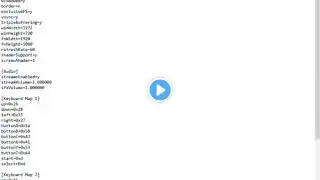
or "How to Run Sonic Mania in Native 4:3 Aspect Ratio". =========================== =TUTORIAL= UPDATED METHOD (Memory Editing No Longer Needed!) Thanks to a user on Reddit (XanderChaos), we now have an .ini command that turns off letterboxing, meaning that Sonic Mania will respect whatever resolution you set. The downside is that you can't set non-widescreen resolutions in windowed mode, BUT; when combined with the Dev Menu .ini setting (which has a 4:3 switch), it will switch to 4:3 while in window without letterboxing! This means you no longer have to memory edit folks! Brief summary of how to do this: 1) Navigate to your Sonic Mania install directory and locate a file called "Settings.ini". 2) Under the [Video] heading put "pixWidth=1" without quotations on a new line (this is the line that disables letterboxing). 3) Under the [Game] heading put "devMenu=1" without quotations on a new line (if you are planning on only playing in full-screen mode, skip ahead to step 5). 4) When running in a window, hit "ESC" on your keyboard, navigate to "Options", then "Video Settings", change "Window Aspect" to "4:3" and hit "Confirm". 5) When in full screen mode, simply pick a 4:3 aspect ratio. This doesn't solve the main menu cropping, but enabled full 4:3 support everywhere else. Hopefully we'll be able to figure that out next! =========================== =ORIGINAL DESCRIPTION= Memory Editing (Old Method) Full credits to the Anonymous user on 4Chan's Sonic the Hedgehog thread. I'll post their Steam name whenever they publicly release their "Sonic Mania Resizer" program or their planned Steam guide. Cheat Engine: http://www.cheatengine.org Cheat Engine Table: http://benjaminrudman.com/temp/SonicM... Keep in mind that any update to Sonic Mania will likely shift the memory addresses, breaking the above table, and you'll have to find the new addresses yourself. Just search for the value "424", which is the default value before it's changed to "320" and you should be able to find it relatively quickly. Finally; please forgive the switch from 30fps and 60fps footage halfway through the video. Some of the footage was taken from my stream playthrough of the game, and YouTube changed the stream to 30fps in conversion. =========================== =WHY 4:3?= Sprite-based games like the original "Sonic the Hedgehog" were originally built and designed with CRT displays in mind when it comes to rendering the graphics and visuals. Here's an example; The waterfalls in the original "Sonic" Genesis/Mega-Drive game use a technique called "dithering". In the 90s, the hardware was not capable of actual transparency, so they would get around this by "cheating". The waterfalls are made by drawing a line of water, then a blank line, then a line of water, and so on. This means that when something is "behind" the waterfall, it fills out the empty lines between the water. This then gets blurred by the TV (or dithered) creating the illusion of a transparent layer of water. Here's an image illustrating this: https://i.imgur.com/8Zu0DRf.png In addition, as with many sprite games of the era, the sprites contain banding that is designed to turn into smooth gradients from the CRT blur: https://i.imgur.com/XcCnB6m.png See how in the above linked image, while the first screenshot is obviously sharper, the second is visually more detailed, shaded and discernible. The sprites have blurred to create detailed looking bricks and shading. Additionally, many of these games had limited color palettes available to them, so to be able to use specific shades of color that the hardware couldn't render, they would "cheat" by placing two different colors next to each other in a small pixel-by-pixel scale, so that the game would blend them together creating the illusion of new colors. Sonic Mania, building heavily on an enginer designed to replicate SNES and Genesis rendering techniques, has it's sprites drawn in an old fashioned manner (the waterfalls in Sonic Mania for example are the same as in the original game). Most CRT displays are in 4:3 aspect, so therefore if you want to display Sonic Mania without stretching or squashing on a CRT, disabling widescreen is a must, this video being the method on how to do so. Sonic Mania is absolutely most fun in HD/widescreen. But it's sprites and visuals look way better on a high quality CRT. All that said, if you're not a sprite/old-school game enthusiast, and just enjoy video games and think Sonic Mania is best in 16:9, that's totally cool too! Just keep in mind that people wanting 4:3 aren't just nostalgia focused. Nostalgia does play a factor, but there are legitimate reasons for wanting to run old games on older hardware. Thanks for watching! Twitler: / benjamoose Goggle+: http://google.com/+Benjamoose Bimjamoss: http://benjaminrudman.com Smashcast: http://www.smashcast.tv/Benjamoose